Install notes · Seat 01
3Win8 app install notes for iPhone, Android and Windows
The 3Win8 iPhone install as the old screenshots show it, from the Install prompt to trusting the enterprise developer, with a few cautions for the Android and PC files.

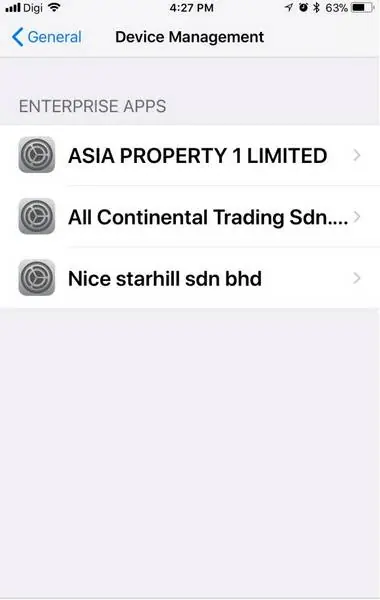
On the iPhone in these screenshots, Settings > General > Device Management already had three company profiles sitting in it. One per casino app. That tells you most of what you need to know about how 3Win8 gets onto an iPhone: it is not an App Store app, and every install leaves a certificate behind.
The old page offered three files for 3Win8, an iPhone build, an Android package and a Windows installer. Only the iPhone route was photographed. We don't host or link any of them.
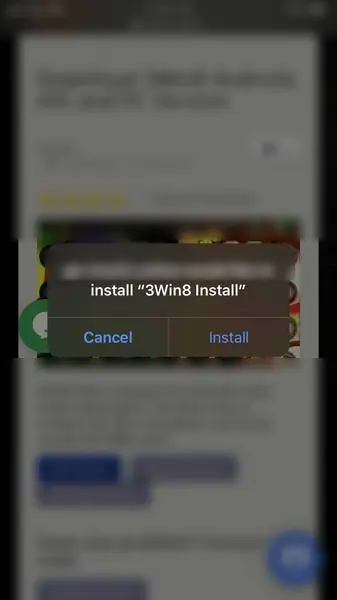
Tapping Install
Safari showed a small grey dialog: the download host "would like to install '3Win8 Install'", with Cancel and Install. After Install, a grey clock-style placeholder labelled "Loading..." sat on the home screen until the rainbow 3Win8 logo replaced it.
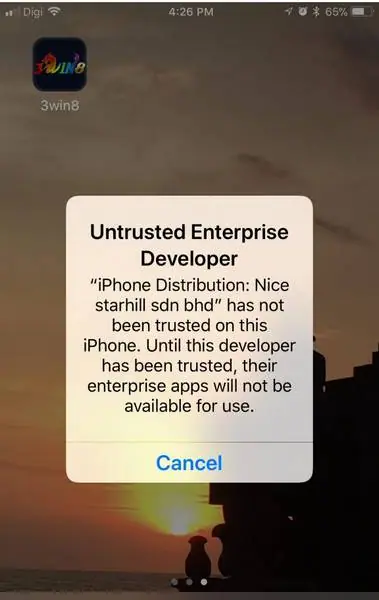
Tap the new icon and nothing opens. You get "Untrusted Enterprise Developer" instead, naming the sdn bhd whose "iPhone Distribution" certificate signed the build, and a single Cancel button.
Where the trust switch hides
Settings, then General, then scroll down to Device Management. Pick the company that matched the warning.
On its page there's a blue Trust line. Tap it and iOS asks once more, in plain words, whether you want to let "any app from this enterprise developer" run on the phone, which "may allow access to your data". I'd read that twice. Say Trust and 3Win8 shows as Verified underneath.
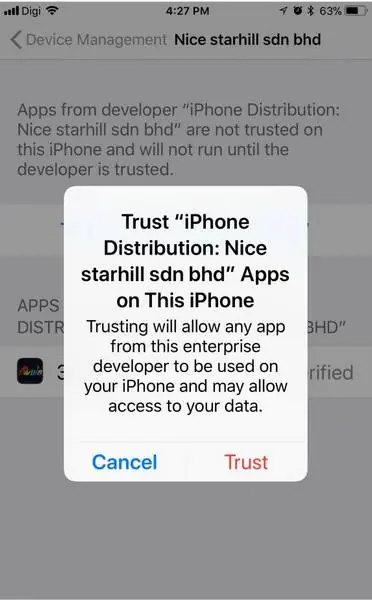
Worth knowing: Apple can pull an enterprise certificate at any time, and when it does the icon just stops opening. The trust also extends to anything else that company signs, so delete the profile when you stop playing.
Android and Windows, without screenshots
Nothing survives for these two. From how sideloading normally works, Android will want you to allow installs from unknown sources for your browser or file manager, and Windows SmartScreen will probably call the installer an unknown publisher. Only go ahead if you trust whoever handed you the file, and switch the unknown-sources setting off again afterwards. No slot app needs your contacts or SMS, so refuse those if asked.
The login screen isn't in the set either. The old page said an agent registers you with a name and phone number and then gives you the game ID and password. If you go that way, get a 3Win8 game ID from someone you trust, and never give them your online banking login. Background on the platform is on the 3Win8 page, and the games we cover are on the 3Win8 hub.
Ask the dealer: common questions
Can I sign up inside the 3Win8 app?
Not according to the old page. An agent opened the account using your name and phone number, then handed over a game ID and password. The app is only for logging in and playing.
18+ only. Real-money games; online gambling is restricted in Malaysia. Never top up money you need, and stop if it stops being fun. Responsible gaming.